Taming the Data Swamp: The Impact of OPTIMIZE, ZORDER, and VACUUM on Delta Tables
When working with large-scale telemetry or Internet of Things (IoT) data, the physical arrangement of data on disk can make or break your pipeline’s query and update performance.
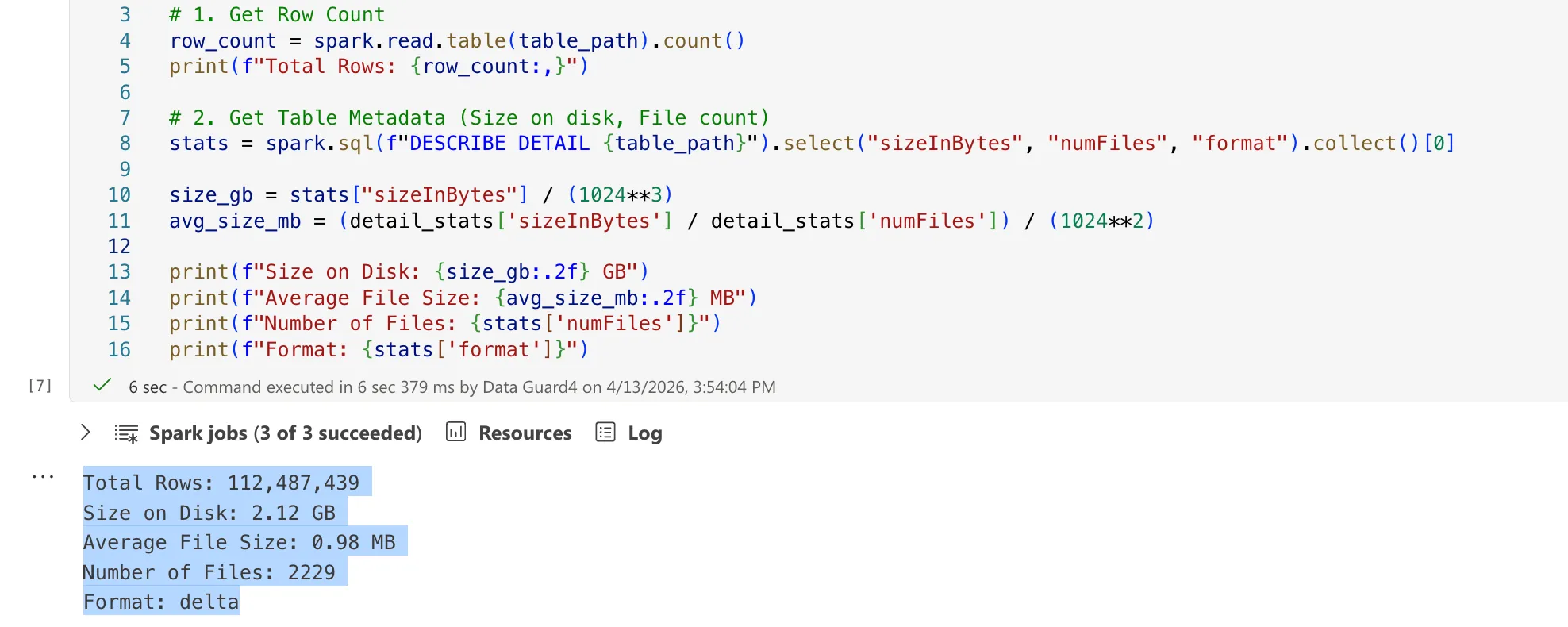
Let’s explore a common scenario: managing a Delta Lake table that continuously ingests readings from a distributed network of IoT weather sensors. To avoid the overhead of over-partitioning—a common pitfall with time-series logs—this table is unpartitioned. Over time, however, our table statistics look like this:
- Total Rows: Approx. 100 million rows
- Size on Disk: Roughly 2 GB
- Number of Files: Over 2,000 files
- Format: Delta
The Schema:
root
 |-- ID: long --MERGE KEY
 |-- DEVICE_ID: string
 |-- SESSION_ID: long
 |-- TIMESTAMP: timestamp
 |-- LAT: decimal(10,7)
 |-- LONG: decimal(10,7)
 |-- TEMPERATURE: decimal(5,2)
 |-- HUMIDITY: decimal(5,2)
 ...
At first glance, relying on roughly 2 GB for ~100 million rows seems incredibly storage-efficient. However, storing this across over 2,000 files means our average file size is less than 1 MB.
We have stumbled directly into the classic “Small File Problem”. When a compute engine like Spark reads this table, it spends more wall-clock time opening, reading metadata, and closing file handles than it does processing the actual data.
To fix this, we need to bring out three of Delta Lake’s superpowers: OPTIMIZE, ZORDER, and VACUUM. But as we will see, executing these commands blindly can introduce severe Write Amplification during MERGE operations. Let’s break down exactly what each command does, evaluate different optimization scenarios against a live dataset, and unpack the “Why” behind their unexpected behaviors.
1. The Core Operations
OPTIMIZE: The Bin-Packing Hero
The OPTIMIZE command is designed to solve the small file problem. It performs a process known as “bin-packing” by systematically reading tiny, fragmented files and compacting them into larger, highly efficient Parquet files (Delta typically targets 1 GB files by default).
ZORDER: The Multi-Dimensional Sorter
Since our table is unpartitioned, how can we make queries faster when a user searches for a specific DEVICE_ID across a certain TIMESTAMP without forcing a full table scan?
ZORDER maps multi-dimensional data into one dimension while preserving data locality. Running OPTIMIZE table ZORDER BY (DEVICE_ID, TIMESTAMP) records the min/max statistics in the Delta Log. When querying for specific devices in specific ranges, Spark effectively skips scanning files that don’t match those parameters entirely.
VACUUM: The Garbage Collector
Because Delta Lake maintains immutable data structures for Time Travel guarantees, OPTIMIZE does not immediately delete the old fragmented files—it simply marks them. VACUUM acts as the garbage collector, permanently deleting these no-longer-referenced data files from your cloud storage.
2. Observing The Merge Paradox: A Controlled Experiment
To understand the true impact of these operations, we tested an UPSERT operation (using the MERGE command) of 140 new/updated records against our ~100M row base table under various optimization conditions.
*Environment Context & Architecture:
- Data Layout & Optimization: Initial file generation, bin-packing, and
OPTIMIZEcommands were executed on a managed cloud Spark cluster. - MERGE Benchmark Engine: The actual heavy lifting—the
UPSERTbenchmarks and shuffle operations mapped below—were executed locally on an Apple Silicon Mac M2 (16 GB RAM) using pure Apache Spark 3.4.4 / Delta Lake 2.4.0 (Open Source - OSS). Forcing a local laptop to churn gigabytes of shuffle data perfectly exposes the brutal real-world cost of Write Amplification.*
Our core MERGE logic was based on joining by the ID column:
ON target.ID = source.ID
Scenario A: The Base (Unoptimized)
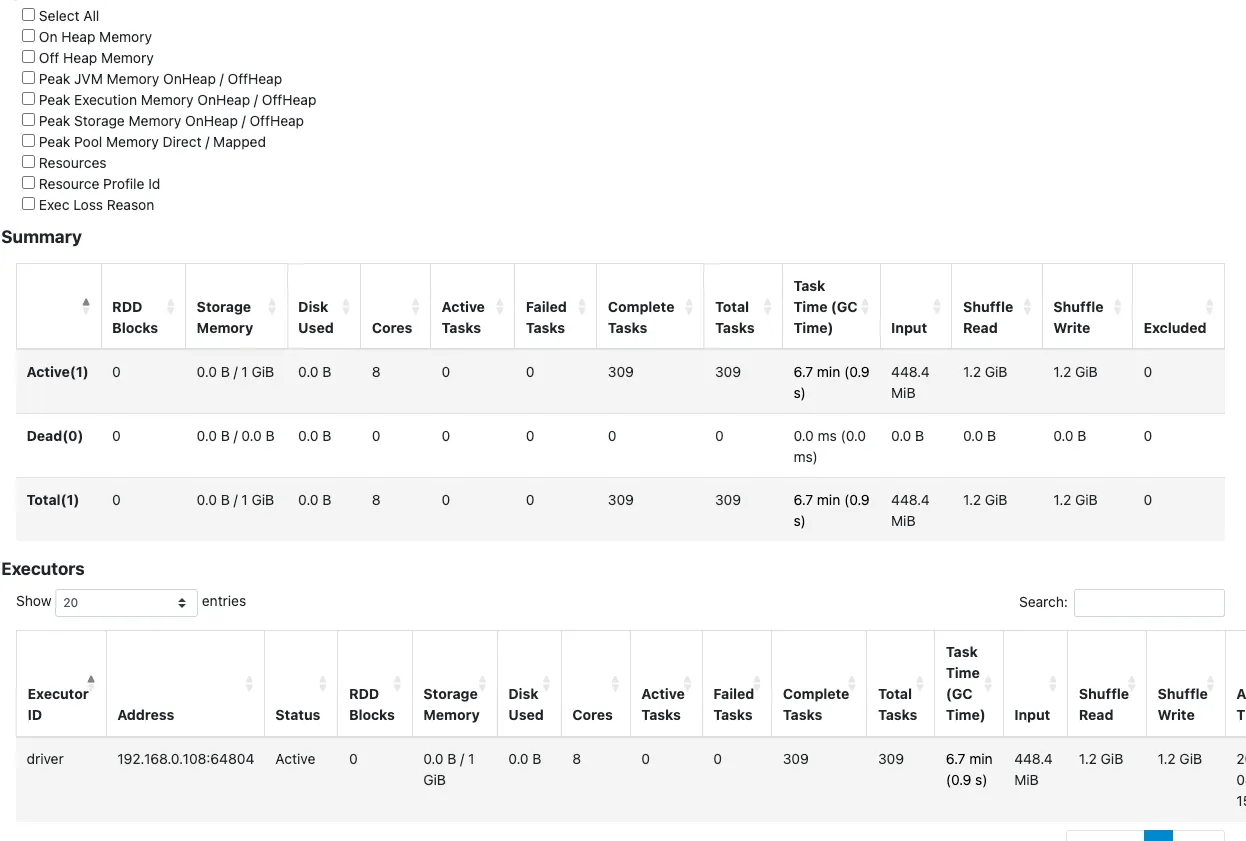
Before any optimization, our table consisted of over 2,000 tiny files (~0.98 MB average).
When we executed the MERGE of 140 rows:
- Shuffle Data: Spark registered 1.2 GiB of shuffle read/write, but heavily suffered from execution latency (task time hit 6.7 minutes).
- Why? Because the files were incredibly fragmented, the read phase opened thousands of files, slowing down processing, even though the final base rewrite size was confined.
Scenario B: OPTIMIZE (Without Z-Order)
We compacted our table using standard bin-packing.
Optimization Metric Details (Delta Log):
| Removed Files | Added Files | Min File Size | Max File Size | Deletion Vectors Removed |
|---|---|---|---|---|
| 2,227 | 1 | 327.08 MB | 327.08 MB | 0 |
- Files: Reduced from 2,229 to 3.
- Average File Size: Spiked to ~720.51 MB.
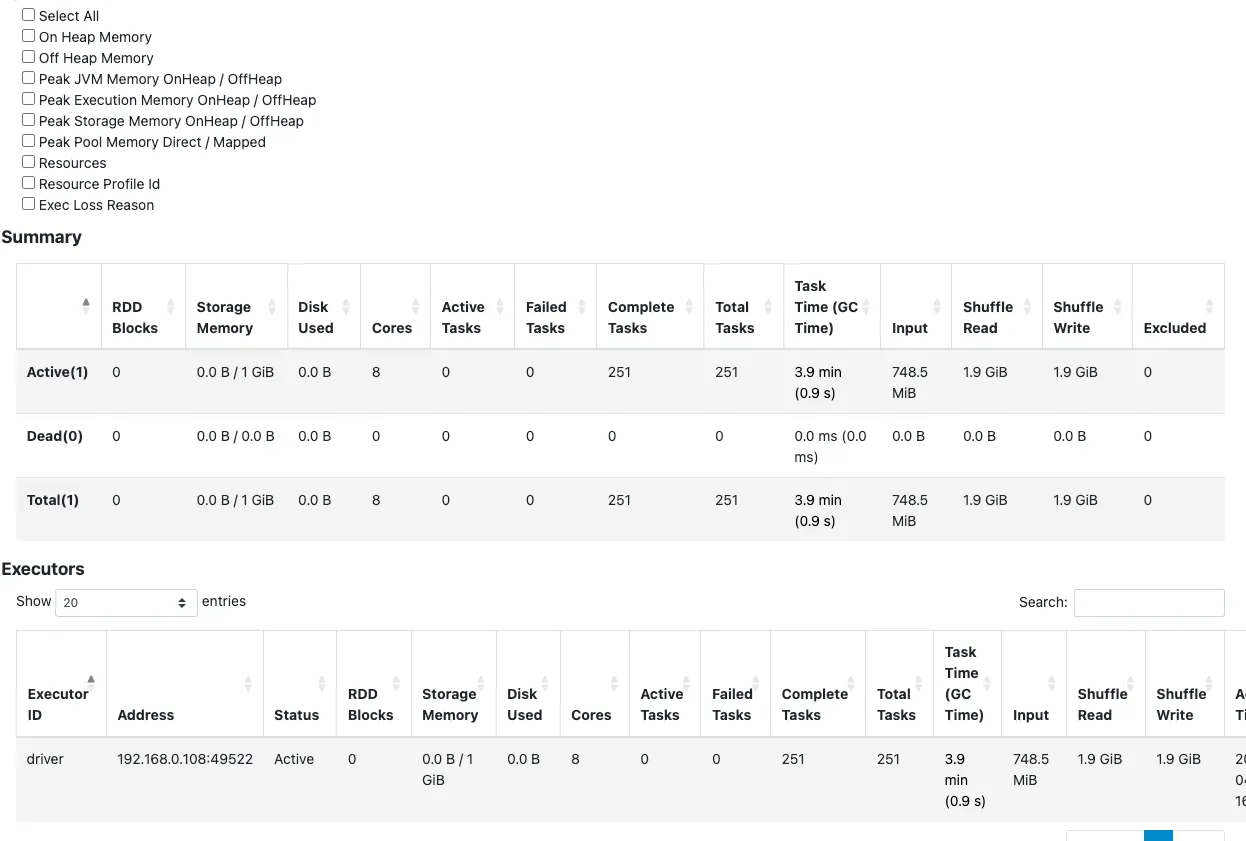
- MERGE Shuffle: Task duration dropped heavily (3.9 minutes), but shuffle data increased to 1.9 GiB!
Scenario C: OPTIMIZE with ZORDER (BY ID)
Since our MERGE essentially joins on ID, we logically expected Z-Ordering by ID to effortlessly scale the MERGE.
OPTIMIZE delta.`{table_path}` ZORDER BY (ID)Optimization Metric Details (Delta Log):
| Removed Files | Added Files | Min File Size | Max File Size | ZORDER |
|---|---|---|---|---|
| 16 | 2 | 1.09 GB | 1.19 GB | ["ID"] |
- Files: Radically reduced to just 2 massive Parquet files (~1.08 GB each).
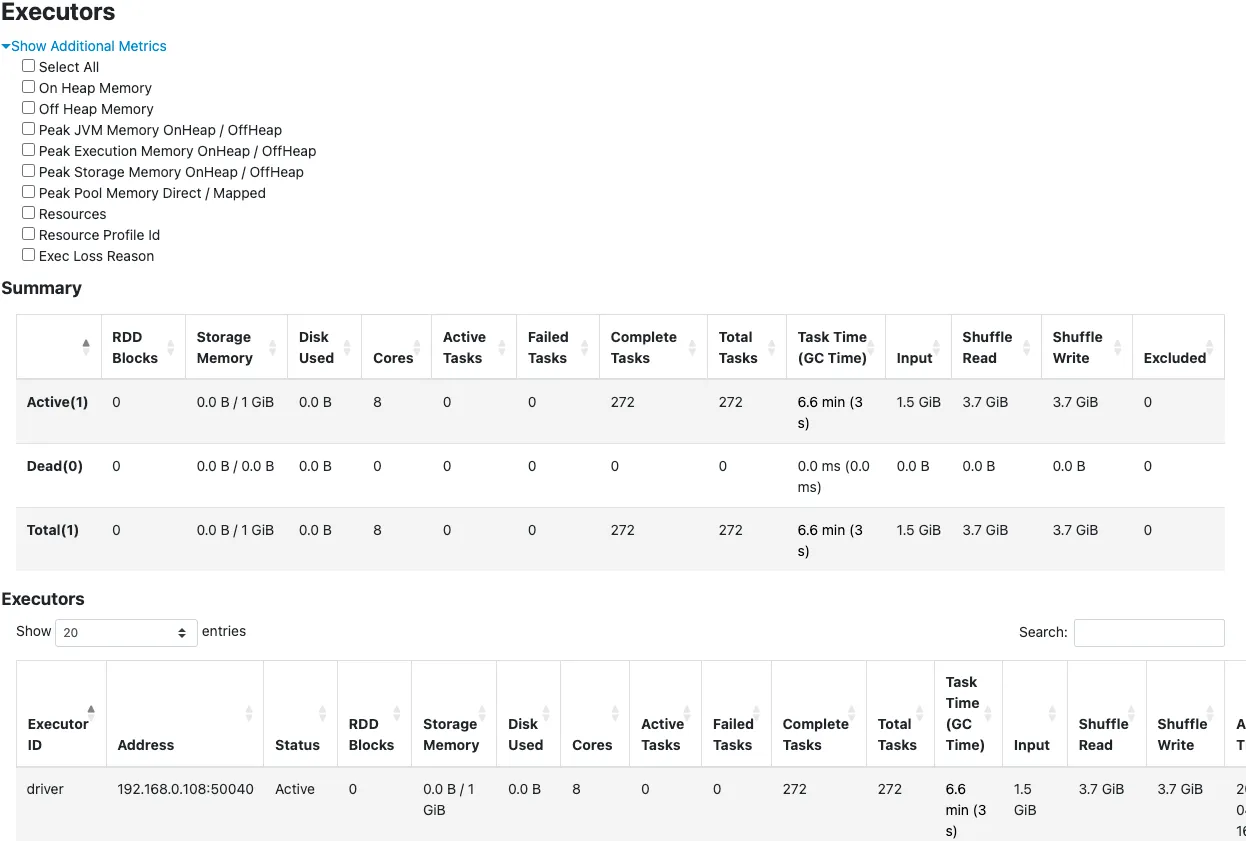
- MERGE Result: Counter-intuitively, the Shuffle Read and Write spiked to an astonishing 3.7 GiB, and task time suffered again (6.6 minutes).
- With VACUUM: Running VACUUM afterward predictably deleted the old files to save storage, but it didn’t fundamentally fix the core issue—our shuffle read/write remained brutally high at 3.6 GiB.
Scenario D: The Danger of Manual Repartitioning
Sometimes, engineers attempt to bypass Delta commands using plain Spark code to force files into smaller chunks:
# Forcing splits purely via DataFrame API
(spark.read.format("delta").load(table_path)
    .repartition(num_partitions)
    .write.option("dataChange", "false")
    .format("delta").mode("overwrite").save(table_path))
Repartition Metric Details (Delta Log):
| Operational Mode | Files Added | Rows Output | Total Bytes Added | Engine |
|---|---|---|---|---|
| Overwrite | 16 | ~100,000,000 | 3,100,000,720 | Apache-Spark/3.4.3 |
- Files: Re-split into 16 files averaging ~184 MB.
File Size Distribution:
| size_bucket | file_count | total_size_mb | min_size_mb | max_size_mb | avg_size_mb | total_rows |
|---|---|---|---|---|---|---|
| 5_128–256 MB | 16 | 2956.39 | 184.6 | 184.93 | 184.77 | ~100,000,000 |
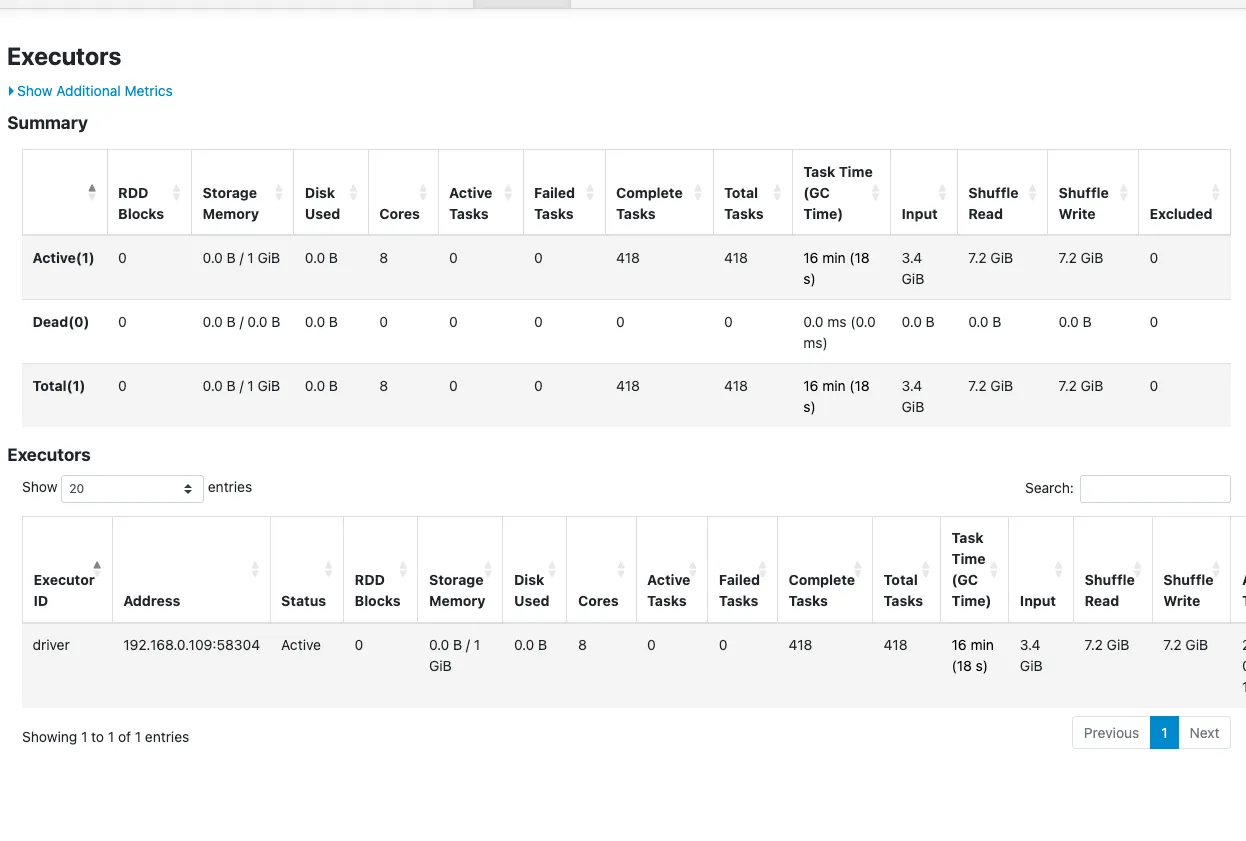
- MERGE Result & The Performance Trap: This was disastrous. Upon merge, Spark spawned 100 disjointed files. Shuffle Read and Write skyrocketed to 7.2 GiB each, punishing execution with a 16-minute task time!
- The “Sleeping Optimize”: When we subsequently tried to run a standard
OPTIMIZEto fix it, Delta silently skipped the operation because it saw the raw file sizes were technically already under optimization target limits.
Scenario E: The Ultimate Compromise (ZORDER + 128 MB Limits)
To get the best of both worlds—efficient data clustering and a small rewrite blast radius—we applied both a strict size cap and deterministic Z-Ordering by ID.
# Note: Executed on managed cloud Spark cluster, which supports passing this Databricks configuration limit
spark.conf.set("spark.databricks.delta.optimize.maxFileSize", 134217728) # 128MB Limit
Optimization Metric Details (Delta Log):
| Removed Files | Added Files | Min File Size | Max File Size | Avg File Size |
|---|---|---|---|---|
| 24 | 24 | 110.98 MB | 140.78 MB | 118.24 MB |
- Files: Controlled cleanly into roughly ~24 mapped files.
- Average File Size: Averaged a sleek ~118 MB natively.
File Size Distribution (Post-Optimization):
| size_bucket | file_count | total_size_mb | min_size_mb | max_size_mb | avg_size_mb | total_rows |
|---|---|---|---|---|---|---|
| 4_50–128 MB | 21 | 2441.56 | 105.84 | 127.28 | 116.26 | 96880028 |
| 5_128–256 MB | 3 | 396.09 | 129.54 | 134.26 | 132.03 | 15607411 |
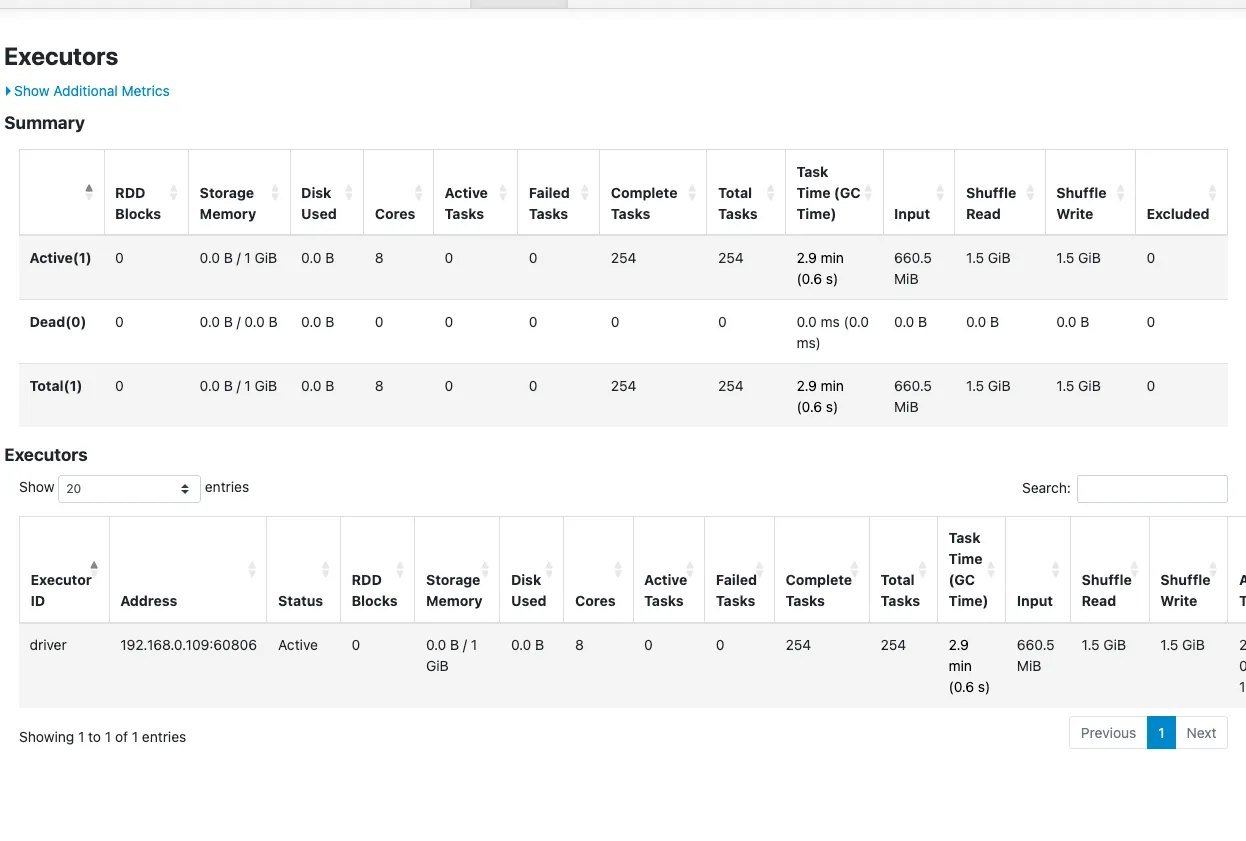
- MERGE Result: The sweet spot. Task time plummeted to a blazing 2.9 minutes, and shuffle metrics crashed to just 1.5 GiB. We gained the rapid file-skipping power of Z-Ordering against a much safer update footprint.
Final File Layout (After Successful Merge):
| size_bucket | file_count | total_size_mb | min_size_mb | max_size_mb | avg_size_mb | total_rows |
|---|---|---|---|---|---|---|
| 2_1–10 MB | 1 | 2.16 | 2.16 | 2.16 | 2.16 | 93655 |
| 3_10–50 MB | 8 | 84.39 | 10.3 | 10.78 | 10.55 | 4600193 |
| 4_50–128 MB | 20 | 2323.77 | 105.84 | 127.28 | 116.19 | 92186180 |
| 5_128–256 MB | 3 | 396.09 | 129.54 | 134.26 | 132.03 | 15607411 |
3. Unpacking the “Why”: The High Shuffle Paradox
If you observed the execution logs closely across our scenarios, you likely noticed a glaring paradox: While standard ZORDER drastically reduced the number of files and accelerated pure SELECT reading, it simultaneously triggered massive surges in Shuffle Data and execution times during MERGE operations.
Why did perfect Z-Ordering (Scenario C) skyrocket our shuffle to nearly 4 GiB just to update 140 isolated rows?
The Under-the-Hood Write Amplification
According to the official Delta Lake OSS specification (index.mdx), “Z-Ordering aims to produce evenly-balanced data files… writing fewer large files is more efficient for reads, but you might still see an increase in write latency.”
Our experiment perfectly proves this architectural warning. Delta Lake does not update individual rows “in place.” When a MERGE operation identifies that a row needs to be updated (or deleted), Delta must structurally recreate and rewrite the entire Parquet file that contains that row.
In our Z-Ordered scenario (Scenario C), the engine aggressively balanced our ~100 million rows into massive files containing over 1 GB of data each. Now, look closely at our 140 upsert rows: their IDs represent a perfectly sequential block.
Because we Z-Ordered by ID, Delta’s data skipping worked perfectly! Spark successfully bypassed the rest of the table and isolated these updates to exactly one single 1.2 GB file (you can see "numTargetFilesRemoved":"1" in the logs). But here is where the Write Amplification traps you:
- Read: To change those 140 perfectly grouped rows, Spark still had to read the entire targeted 1.2 GB Parquet file into memory.
- Perform the Shuffle Join: It joined the incoming streaming updates against that massive 1.2 GB memory footprint.
- Rewrite: It was forced to physically rewrite the entire gigabyte-scale block back out to cloud storage.
This dynamic represents Write Amplification at its worst. Even with perfect Z-Ordering and flawless data-skipping picking the best possible contiguous file, a tiny 140-row update forced Spark to shuffle and brutally roar through gigabytes of I/O simply because the destination file was a monolith.
File Skipping vs. The Rewrite Blast Radius
When we look at Scenario E (ZORDER + 128 MB Limit), we find an architectural balance. We capped the files at 128 MB. As a result, the engine consolidated files powerfully enough to solve the overarching “Small File Problem” for analytics, but we crucially kept the blocks scaled down so that an UPSERT operation implicitly demanded Delta only rewrite a localized 128 MB segment instead of a 1 GB monolith. The “blast radius” for any single record update was severely contained.
Furthermore, we proved that using Spark’s basic .repartition (Scenario D) fails immensely because it haphazardly scatters records across partitions without logical ordering metadata, completely destroying your merge join bounds.
4. Modern Solutions to Write Amplification
To actively mitigate write amplification on large Lakehouse architectures—especially those sustaining frequent, high-volume MERGE loads—embrace these modern feature sets:
- Precision File Tuning (
targetFileSize) (Supported in: OSS & Databricks): As heavily demonstrated, setting intentional size ceilings alongside Z-Ordering securely controls the blast radius of a rewrite. In Delta OSS, this is implemented natively via the table propertydelta.targetFileSize. By configuring this ceiling, the engine gracefully balances chunks downward instead of defaulting blindly to 1 GB. - Low Shuffle Merge (Supported in: Databricks Only): This is a powerful proprietary engine optimization enabled natively in Databricks Runtimes (10.4 LTS+). It does not exist in open-source Delta. It targets unmodified rows precisely to intentionally preserve existing file placements without initiating brutal re-shuffle processes.
- Deletion Vectors (Supported in: OSS Delta 2.3+ & Databricks): Operating exactly as defined in Delta’s inner
PROTOCOL.mdspecification, Deletion Vectors solve the root-cause write penalty flawlessly. Instead of a hard compaction cycle, they allow Delta to virtually mark physical rows as “deleted/updated” by writing a separate JSON sidecar metadata array (often just a few discrete bytes). This cleanly bypasses rewriting the parent 1 GB Parquet file during theMERGE. The heavy physical Parquet pruning is deferred transparently until you explicitly trigger anOPTIMIZE. (Note: Deploying this in OSS requires explicitly runningALTER TABLE target SET TBLPROPERTIES('delta.enableDeletionVectors' = true)).
Conclusion
Transforming a fragmented data swamp into a resilient Lakehouse pipeline demands far more than running OPTIMIZE on autopilot. By comprehensively charting how your physical storage blocks collide dynamically with MERGE mechanics under the hood, you can precisely tune your architectures to perform aggressively for both ingestion algorithms and user analytics simultaneously.
5. References & Further Reading
The insights and architecture behaviors mapped out in this deep dive are grounded in official Delta Lake protocols. If you’re building a highly-scaled Lakehouse, I recommend reading through the official specifications:
- Z-Ordering & Data Skipping Constraints: Delta Lake OSS Optimizations (
index.mdx) - Details on how Z-Ordering colocates data and the architectural limits of sorting by high-cardinality values. - Deletion Vectors Protocol: Delta Transaction Log Protocol (
PROTOCOL.md) - The official spec on how Deletion Vectors physically decoupleMERGEoperations from immediate Parquet file rewrites by mapping relative sidecar JSON arrays via active transactions. - Update & MERGE Architectures: Delta Update Operations (
delta-update.mdx) - Specifications detailing how theMERGE INTOoperation executes against existing file pools. - Databricks Low Shuffle Merge Engine: Databricks Official Documentation - Deep dive on how modern computational runtimes (Databricks 10.4 LTS+) intelligently restrict shuffle loops for unmodified rows.